Our Products

Explore our collection of high-quality products designed to meet your needs.
Scalpel
WIndows, Powershell $0.00

Scalpel

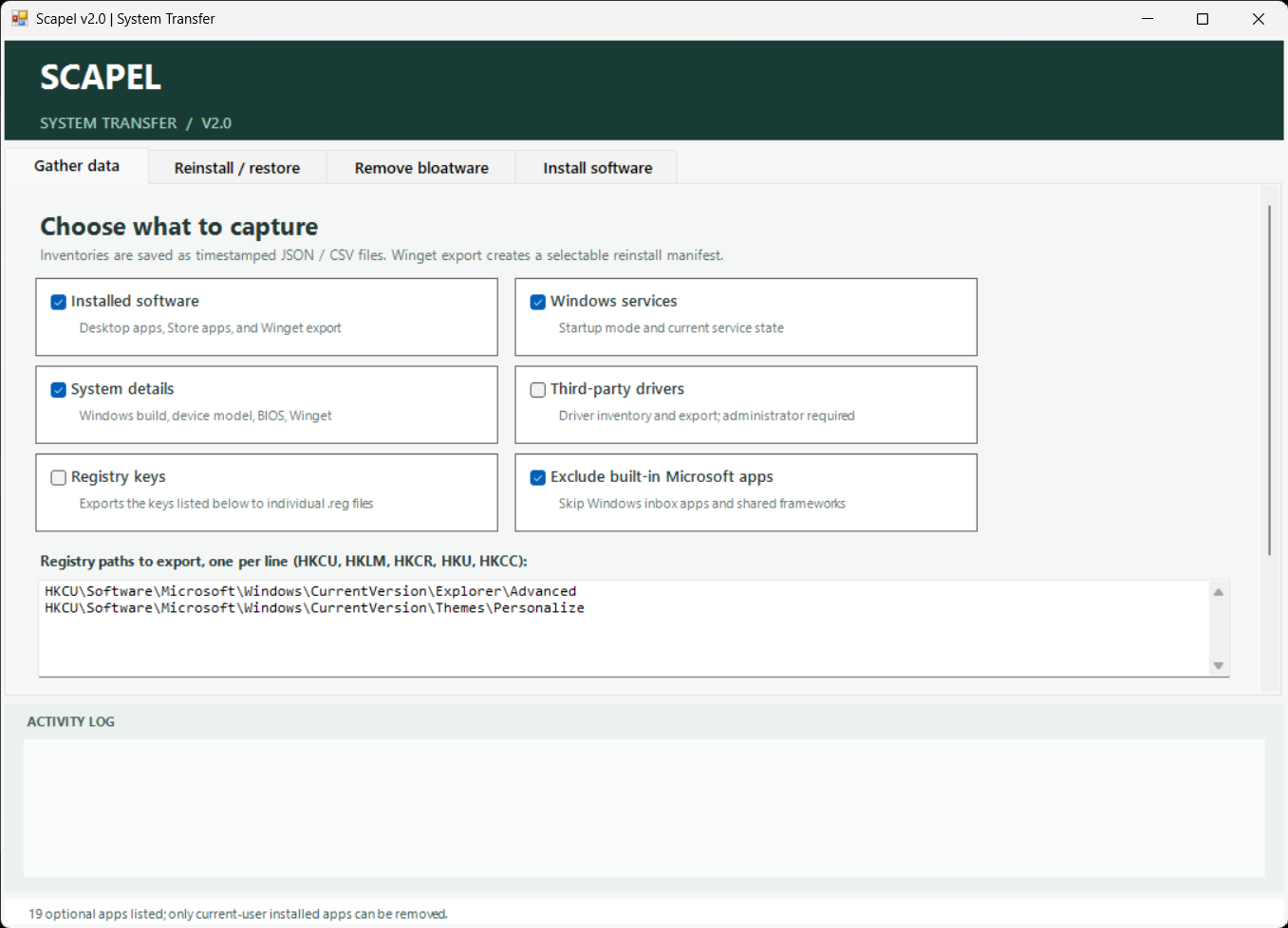
Scalpel v2.0 is a Windows system-transfer utility for collecting selected software, service, system, registry, and driver information into a backup folder or ZIP archive. It also helps restore selected items, install common software, remove optional apps, and apply registry tweaks, with confirmation for system-changing actions.

About This Product

Scalpel v2.0 User Guide

Scalpel helps you collect selected Windows system information, review backup contents, restore selected items, remove optional built-in apps, and install common software. Review each selection carefully: restore and system-tweak actions can modify Windows settings.


Start Scalpel

Run the Scalpel PowerShell script locally on the Windows PC. If Scalpel is not running as Administrator, it asks whether to relaunch with elevated privileges. Some features, such as driver operations and machine-wide registry tweaks, require Administrator access.

Keep Scalpel open while a background operation is running. Progress and results appear in the Activity Log.


Gather Data

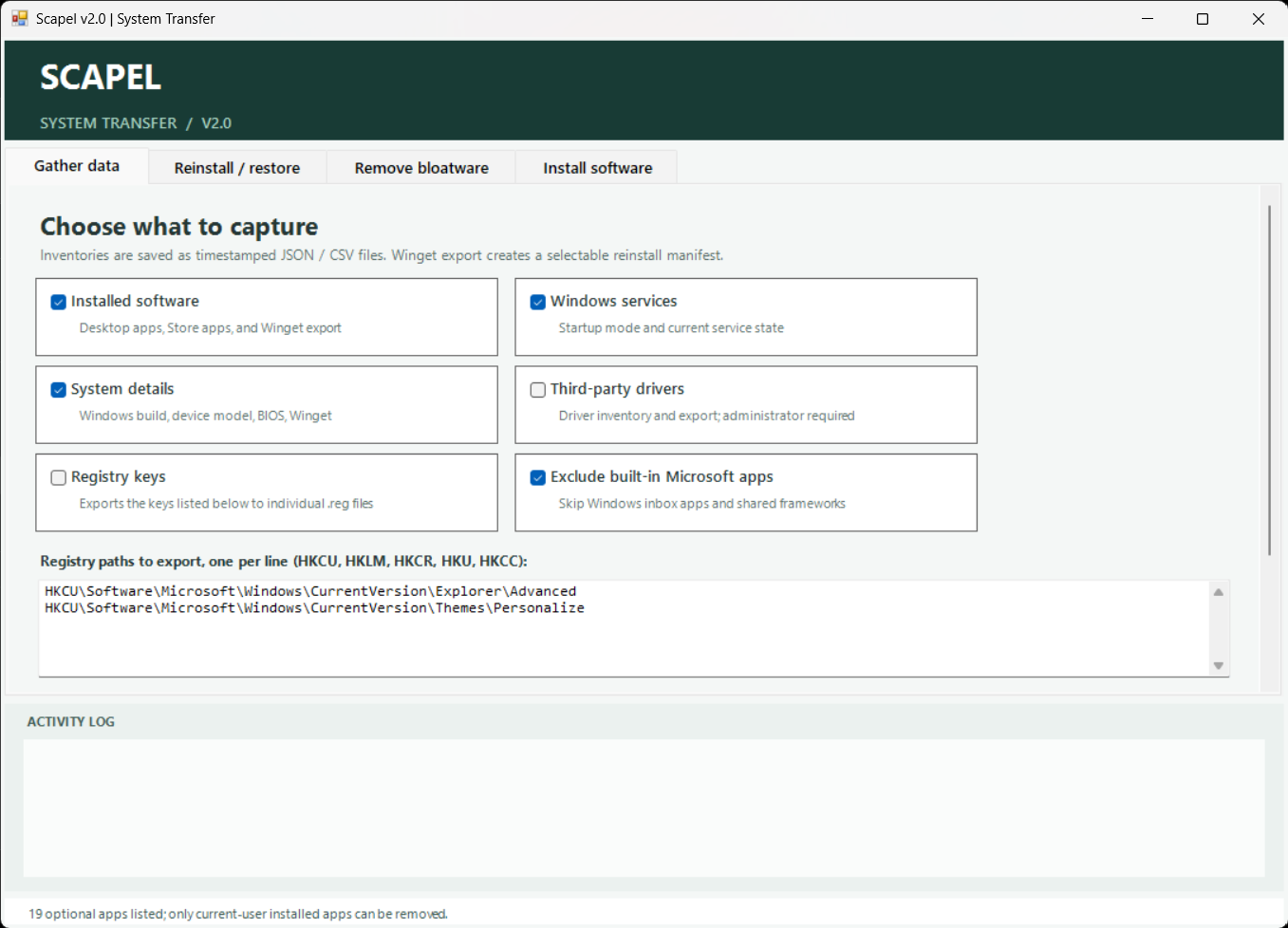
  1. Open Gather data and select the categories to collect: installed software, Windows services, system details, third-party drivers, or registry keys.
  2. To export registry keys, leave or edit the paths in the text box. Enter one registry path per line.
  3. The Exclude built-in Microsoft apps/frameworks option is selected by default.
  4. Choose a backup destination. Scapel creates a timestamped backup folder inside it.
  5. Select Create ZIP archive if you also want a .zip beside the backup folder for transfer.
  6. Select Gather selected data and monitor progress in the Activity Log.

Driver collection requires Administrator access. The ZIP option is off by default; when enabled, Scalpel retains the folder as well as creating the archive.


Restore or Reinstall

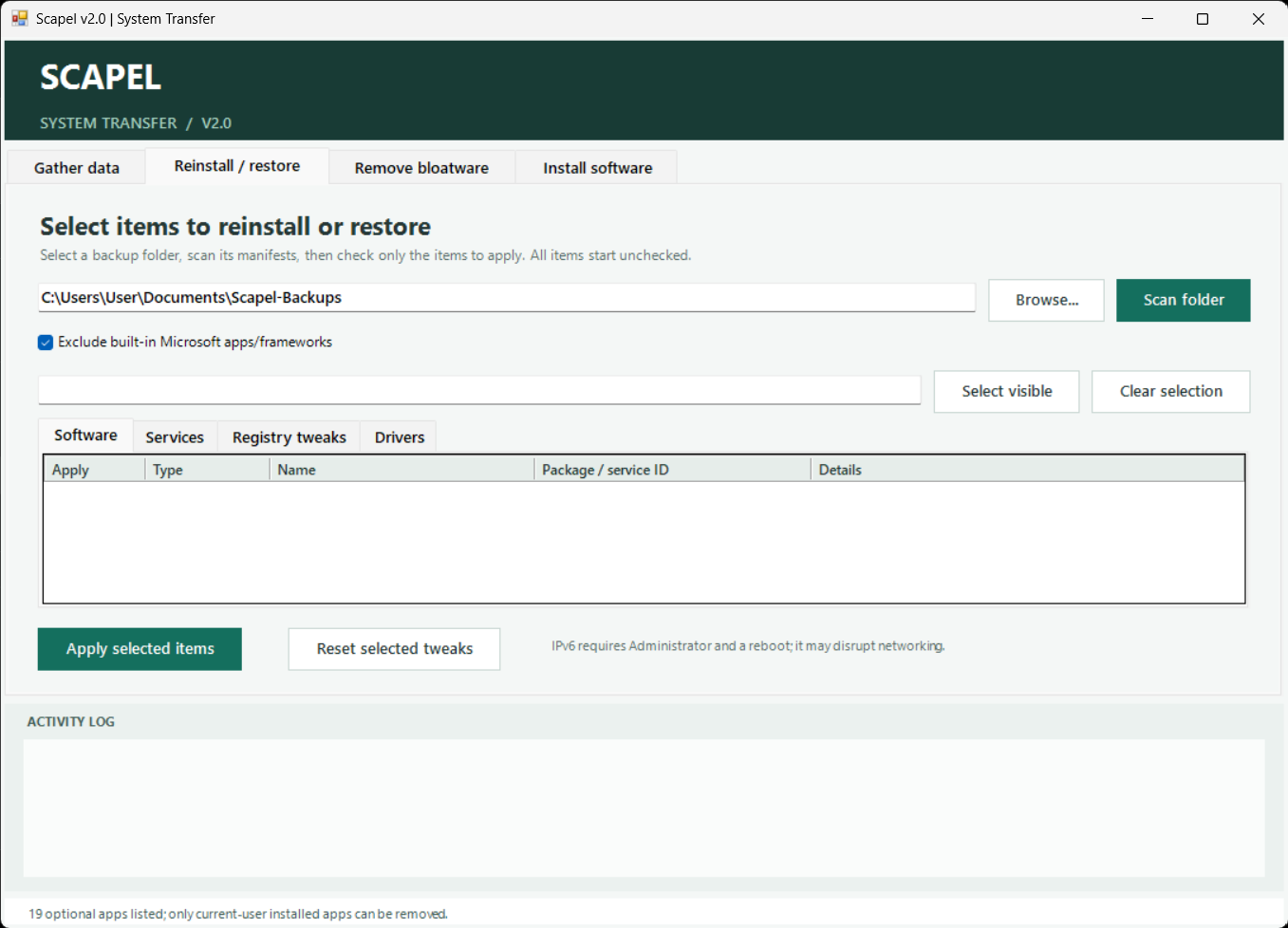
  1. Open Reinstall / restore.
  2. Enter a backup folder, or select Import ZIP… to extract and load a Scapel backup archive.
  3. Select Scan folder. Scapel loads matching software, service, registry, and driver items into separate tabs.
  4. Select the items to apply. Restore items are unchecked by default; selections persist when switching tabs.
  5. Select Apply selected items and review the confirmation before proceeding.


The Select visible and Clear selection buttons apply to the current tab. The built-in Microsoft app filter is enabled by default for software entries.


Software selections install through the displayed package source. Service restoration changes the saved startup mode; it does not change whether the service is currently running. Registry files can overwrite existing values. Driver installation requires Administrator access and can affect connected hardware.


Registry Tweaks

The Registry tweaks tab lists privacy, appearance, performance, and network settings. Select the tweaks you want and choose Apply selected items. Use Reset selected tweaks for the catalog’s reset action.


β€œReset” does not always restore a saved copy of your prior settings. Depending on the tweak, it may write a catalog value or remove the Scalpel override. The SvcHostSplitThresholdInKB tweak calculates a value from installed physical memory and requires a reboot. Disabling IPv6 is an advanced change that may disrupt networking and also requires a reboot.


Remove Bloatware

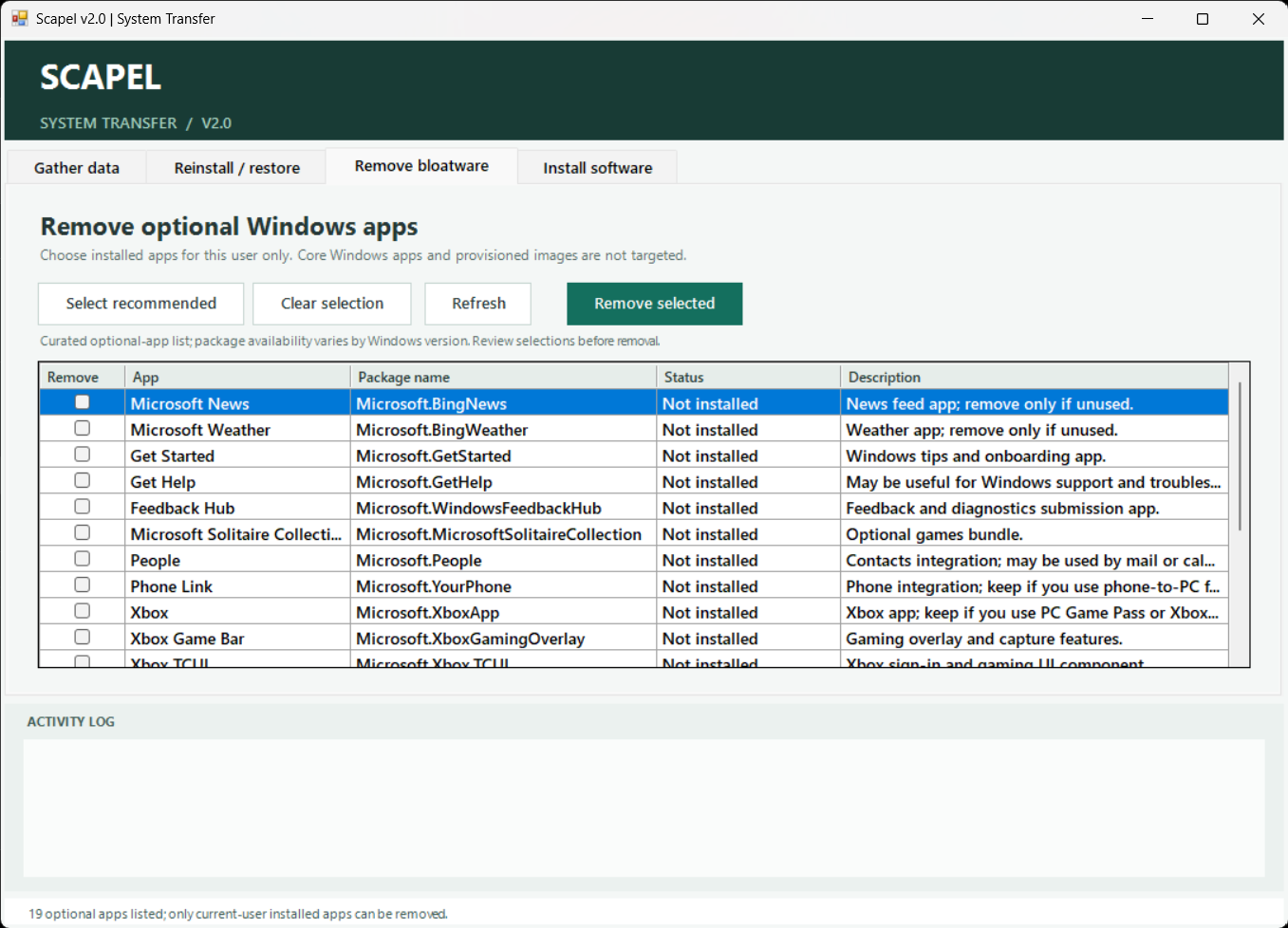
The Remove bloatware tab lists optional Windows apps and shows whether each is installed for the current user.

  1. Select individual apps, or choose Select recommended to select installed apps marked as recommended.
  2. Review the selection and choose Remove selected.
  3. Confirm the removal.


Scalpel removes only the selected current-user Appx packages. It does not remove apps for all users or from the Windows image. Reinstallation may require Microsoft Store.


Install Software

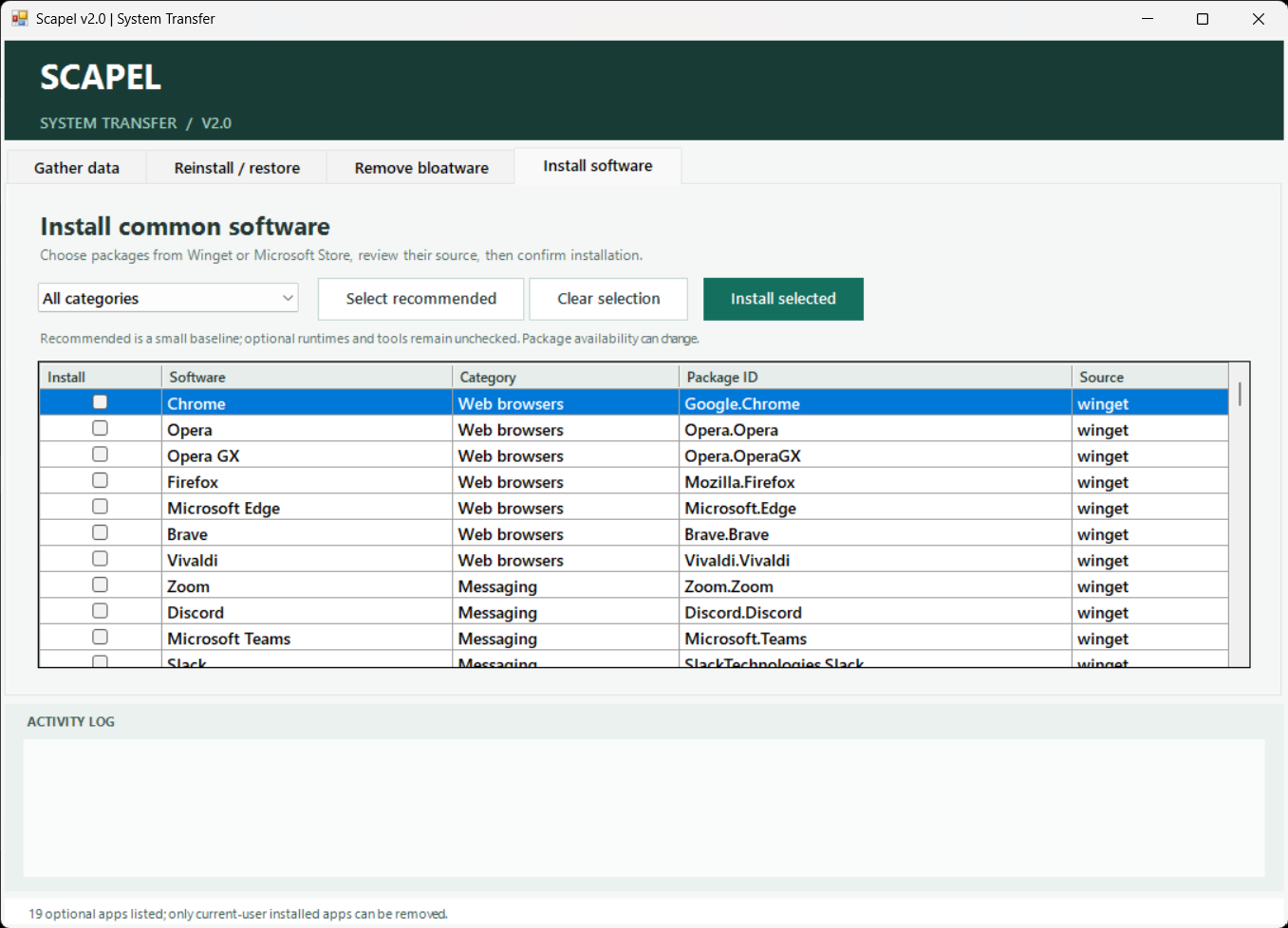
The Install software tab lists software by category, including the package ID and source.

  1. Choose a category or All categories.
  2. Select individual packages, or choose Select recommended.
  3. Review the package IDs and sources, then choose Install selected.
  4. Confirm the installation.


Installations use Winget with the listed source, including Microsoft Store where specified. An internet connection is required, and availability may change. Only select software you trust.


ZIP Backup Transfer

When Create ZIP archive is enabled during gathering, Scalpel creates a ZIP file next to the timestamped backup folder. On the receiving PC, open Reinstall / restore, choose Import ZIP…, select the archive, and scan the extracted backup. Review and select restore items before applying them.

Read More

Key Features

  • System data collection: Gather software, Windows service settings, system details, third-party driver information, and selected registry keys.
  • Microsoft app filtering: Exclude recognized Windows inbox apps and frameworks from software inventories and reinstall manifests.
  • Transfer-ready backups: Save timestamped backups and optionally create a ZIP archive for transfer to another PC.
  • Backup import: Import a Scapel ZIP backup and scan it for available restore items.
  • Selective restore: Review and choose software, service startup settings, registry files, and driver packages across separate tabs.
  • Registry tweaks: Apply selected privacy, appearance, performance, and network settings, including the RAM-based service-host threshold.
  • Optional app removal: Review installed optional Windows apps and remove selected packages for the current user.
  • Software installation: Browse software by category, select recommended packages, and install from Winget or Microsoft Store.
  • Admin and reboot guidance: Prompt for Administrator access when needed and flag tweaks that require a restart.
  • Activity log: Follow background operations and review their results.


Show All Features

Specifications


View Specifications
TylFuzn
Web App $0.00

TylFuzn

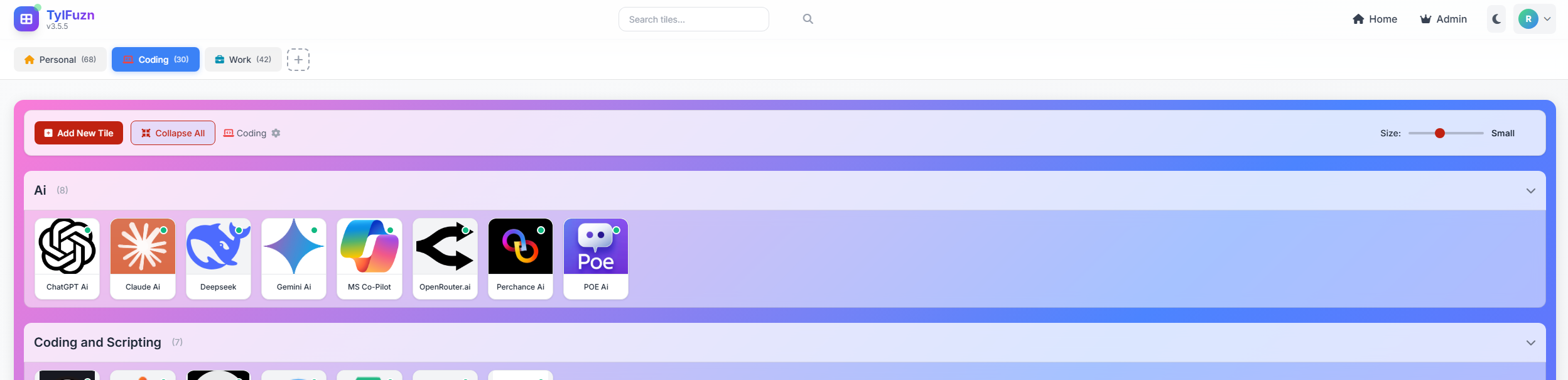
TylFuzn: The Ultimate Customizable Dashboard for Work, Play, and Everything in Between. Are you drowning in a sea of browser tabs and disorganized bookmarks? It's time to reclaim your digital sanity with TylFuzn, the revolutionary tile-based dashboard that transforms the way you interact with the web. TylFuzn is more than just a start page; it's a powerful productivity tool, a personal organizer, and a stunningly beautiful gateway to your digital world.

About This Product

Unleash Your Creativity with Limitless Customization

Your dashboard should be a reflection of you. With TylFuzn, you have the power to create a truly personalized experience.


  • A Visual Masterpiece: Say goodbye to boring, generic start pages. TylFuzn offers a breathtaking collection of over 100 background gradients, from serene and minimalist to bold and vibrant. Prefer a solid color? We've got you covered. You can even create your own custom themes, choosing your own primary, secondary, and accent colors to create a look that's uniquely yours.
  • Your Space, Your Rules: Organize your tiles in a way that makes sense to you. Choose from multiple grid layouts to create the perfect arrangement for your needs. Whether you prefer a compact and efficient layout or a more spacious and relaxed one, TylFuzn adapts to your workflow.


Effortless Organization for Maximum Productivity

TylFuzn's intuitive tile-based system makes it easy to organize your digital life and find what you need in an instant.


  • Workspaces for Every Aspect of Your Life: Don't let your work and personal life get jumbled together. With TylFuzn, you can create separate workspaces for each of your projects, interests, and clients. Keep your work-related links in one workspace, your personal projects in another, and your favorite hobbies in a third. It's the ultimate way to stay organized and focused.
  • Public and Private Tiles for Seamless Collaboration: TylFuzn makes it easy to collaborate with others. You can set your tiles to be public or private. Keep your personal links private, and share your public tiles with colleagues, clients, or friends. It's the perfect way to share resources, create a team dashboard, or simply show off your favorite websites.
  • Find Anything in a Flash: With the powerful built-in search functionality, you can find any tile in your workspace in a matter of seconds. No more endless scrolling or searching through folders. Just type what you're looking for, and TylFuzn will do the rest.

Secure, Accessible, and Always at Your Fingertips

TylFuzn is designed to be your secure and reliable gateway to the web.


  • Rock-Solid Security: We take your security seriously. TylFuzn features a robust user authentication system with "Remember Me" and "Forgot Password" options. You can also sign in with your Google account for a seamless and secure login experience.
  • Access from Anywhere: Thanks to its responsive design, your TylFuzn dashboard looks and works great on any device. Whether you're on your desktop, tablet, or smartphone, you'll always have access to your personalized dashboard.

Experience a Better Way to Browse the Web

TylFuzn is more than just a tool; it's a new way of thinking about your relationship with the web. It's about taking control, staying organized, and creating a digital environment that's both beautiful and functional.


ο»Ώο»Ώο»Ώο»ΏJoin the TylFuzn community today and start building the dashboard of your dreams!

Read More

Key Features

  • πŸ’Ό Customizable Workspaces: Create and manage multiple workspaces for different projects, clients, or personal interests.
  • β–¦ Tile-Based Dashboard: Organize your favorite websites and online resources into a clean, intuitive, and visually appealing tile-based layout.
  • 🎨 Extensive Customization: Personalize your dashboard with over 100 background gradients, solid colors, and multiple theme presets.
  • πŸ–ŒοΈ Custom Themes & Layouts: Create your own unique themes with custom colors and arrange your tiles in various grid layouts to suit your workflow.
  • πŸ”— Public & Private Tiles: Keep your personal links private and share public tiles with colleagues, clients, or friends for easy collaboration.
  • G Google Login: Sign in quickly and securely with your Google account.
  • πŸ” Instant Search: Find any tile in your workspace in a flash with the powerful built-in search functionality.
  • πŸ“± Responsive Design: Access your dashboard from any device, with a design that adapts to desktops, tablets, and smartphones.


Show All Features

Specifications


View Specifications
Site Builder
Web Site Framework $0.00

Site Builder

Lightweight website builder framework

About This Product

PoshCodex.co.uk is a custom-developed web platform designed to serve as a dedicated portfolio and knowledge base for advanced technical content. Built from the ground up using PHP, the site is optimized for performance and clarity, providing a clean and efficient user experience for visitors interested in specialized software development and scripting. This bespoke approach allows for unique features and a structure perfectly aligned with the site's focus on sharing in-depth articles and custom tools like the "PoshCodex" PowerShell module.

Read More

Key Features

Custom PHP Backend: The site is powered by a custom PHP framework, offering complete control over functionality and design.

Project Showcase: It's built to effectively display and document specific software projects, such as the AI-powered PowerShell autocompletion tool.

Technical Blog: The structure supports a blog format with articles that include specialized code snippets and technical breakdowns.

Lightweight and Fast: By avoiding the bloat of commercial site builders, the website can be highly optimized for fast loading times.

Direct Code Integration: A custom build makes it easier to integrate and display formatted code, a crucial feature for a technical website.

Show All Features

Specifications


View Specifications
Toil Tracker
Web App $0.00

Toil Tracker

Toil Management made easy

About This Product

Toil Tracking made easy with this web based solution.


Demo site login:


Username: demouser

Password: demouser1


Read More

Key Features

Approvals for claimed toil

Approvals for taking toil time.

Individual departments can have their own approvals.

Reporting that is exportable to PDf

Show All Features

Specifications


View Specifications
Status Monitor
Web App $0.00

Status Monitor

Monitor your value web assets, servers and API's

About This Product

Keep your digital services running smoothly with the StatusMonitor from Posh Codex. This powerful and easy-to-use tool provides real-time monitoring for your websites, servers, and printers, ensuring you are the first to know about any performance issues or downtime. With customizable alerts and detailed uptime reports, StatusMonitor helps you maintain service reliability and quickly address any incidents before they impact your users.

Read More

Key Features

Real-time Monitoring: Actively checks the status of your printers, websites, and servers.

Customizable Alerts: Receive notifications through Microsoft Teams for offline events or performance warnings.

Detailed Reporting: Generate uptime reports with key statistics like uptime percentage, total downtime, and the number of incidents.

Flexible Views: Switch between a compact "Badge View" and a more detailed "List View" to suit your needs.

Performance Thresholds: Set custom response time thresholds (in milliseconds) to define "Warning" and "Online" statuses.

Status Filtering: Easily filter the dashboard to show all services or only those that are online, offline, in maintenance, or have warnings.

Auto-Refresh: Keep your dashboard updated with automatic refreshes at configurable intervals (e.g., 30s, 1m, 5m).

Maintenance Mode: Schedule maintenance periods for services to prevent false alerts.

Alert Muting: Temporarily mute notifications for specific services for 1, 8, or 24 hours.

Show All Features

Specifications


View Specifications
Daily Standup Notes
Web App $0.00

Daily Standup Notes

Organise your teams notes and keep track

About This Product

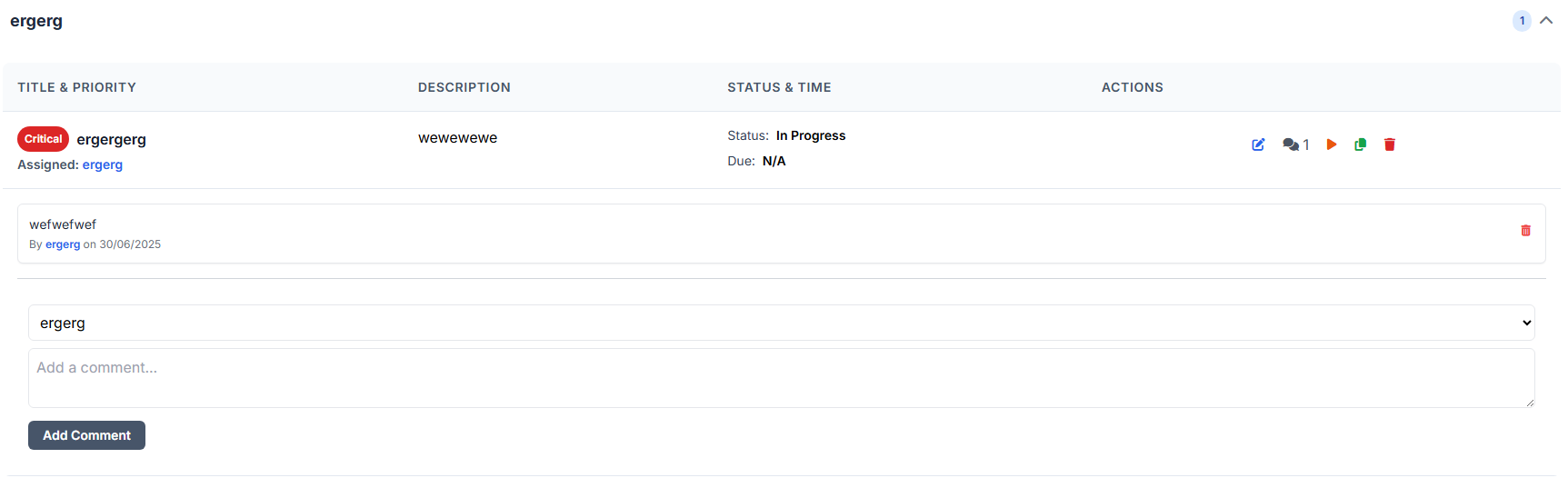
Streamline your daily team meetings with the Advanced Daily Stand-up tool from Posh Codex. This comprehensive platform helps you manage and track team progress with an intuitive Kanban view, powerful analytics, and detailed task management. Gain valuable insights into your workflow with a dashboard that visualizes task status, user assignments, and project priorities. this tool is designed to make your daily stand-ups more organized, efficient, and productive.

Read More

Key Features

  • Time tracking
  • Task templates
  • Robust import/export options
  • PDf reports
Show All Features

Specifications


View Specifications
Web Code Vuln Scanner
Web App $0.00

Web Code Vuln Scanner

Scan your web code for vulnerabilities

About This Product

Upload (or paste) web code into the webapp to scan for any vulnerabilities, it will provide you with an immediate report which is downloadable.

Read More

Key Features

Categories risk level

free onsite report

free downloadable report

easy to use

compatible with

  • html
  • php
  • css
  • javascript
  • aspx
Show All Features

Specifications


View Specifications
RSSView
WebApp $0.00

RSSView

Aggregate RSS feeds into one place, in categories

About This Product

Display RSS feeds for sites (including Reddit) showing new arcticles more prominently

Read More

Key Features

RSS web feed injesting

Reddit / sub reddit injesting

Selectable Categories

Public and Private feed (yours are yours no one else can see them)

Show All Features

Specifications

None

View Specifications
Standard Operating Procedure Generator
Web Generator $0.00

Standard Operating Procedure Generator

Generate Standard Operating Procedures (SOP) with ease

About This Product

πŸš€ Introducing the Standard Operating Procedure Generator by PoshCodex


Create, edit, and export professional SOP documents effortlessly with the SOP Generator. Designed with a modern and intuitive interface, this tool helps streamline your documentation process by allowing you to:


Whether you're standardizing workflows or onboarding teams, PoshCodex’s SOP Generator is your go-to solution for producing clean, consistent, and export-ready SOPs in minutes.


Try it here

Read More

Key Features

βœ… Fill in essential SOP details (Title, Application, Author)

βœ… Automatically log creation and review dates

βœ… Upload a company logo for polished branding

βœ… Choose from templates, view history, and export with a click

Show All Features

Specifications

Not Applicable

View Specifications
Virus Total Hash Scanner
Web App / MSI $0.00

Virus Total Hash Scanner

Scan multiple file hashes by uploading a single file

About This Product

πŸ” VT-HashScanner: Simple File Hash Scanning with VirusTotal

VT-HashScanner is a lightweight utility designed to scan one or multiple file hashes against VirusTotal. Whether you’re checking a single hash or importing a batch via .csv or .txt, this tool streamlines the process using PowerShell behind the scenes.


πŸ§ͺ Verified & Safe:

The MSI installer has been scanned and verified on VirusTotal.

πŸ‘‰ View scan results

πŸ“₯ Download from GitHub


Try our online version today


Disclaimer: This utility is independently developed and not affiliated with or supported by VirusTotal.


Read More

Key Features

  1. πŸ”„ Supports single hash input or bulk ingestion via CSV/TXT files
  2. πŸ” Requires your own VirusTotal API key
  3. ⏱️ Throttle-aware based on your API key tier (Corporate keys can disable throttling)
  4. πŸ“Š Results displayed in a clean, color-coded datagrid
  5. πŸ“€ Export results to CSV reports for easy sharing or auditing


Show All Features

Specifications


View Specifications